Knowledge
Why Does a Continuous Zoom Lens Change Detection Position After Magnification Adjustment?
Introduction
In machine vision applications, a continuous zoom lens allows users to adjust magnification without replacing the lens, making it suitable for applications requiring both a large field of view and detailed inspection.
However, during practical deployment, engineers may encounter a common issue:
After changing the magnification, the inspected object becomes larger, but its position in the image shifts and no longer matches the original inspection area.
This phenomenon does not always indicate a lens failure.
The image displacement may result from multiple factors, including:
- Internal optical group movement
- Lens-camera alignment errors
- Working distance variation
- Focus changes after zoom adjustment
- Different calibration requirements at different magnifications
Understanding these factors is essential for achieving stable multi-magnification machine vision inspection.
1. Common Symptoms After Zoom Adjustment
When switching from low magnification to high magnification, typical issues include:
- The workpiece remains centered at low magnification but moves toward one side at high magnification
- The predefined inspection region no longer matches the target
- Returning to the same zoom position produces slightly different images
- Measurement coordinates change after zoom adjustment
- Image sharpness decreases after magnification change
Before troubleshooting, engineers should distinguish between:
Field of view change,image center shift, and focus variation.
2. Field of View Change vs Image Shift vs Defocusing
2.1 Field of View Change
When magnification increases:
- Field of view becomes smaller
- Object size in the image increases
- More detailed features become visible
This is normal behavior.
For example:
At low magnification, the entire electronic component can be observed.
At high magnification, only:
- markings
- solder joints
- edge defects
may appear in the image.
This does not mean the optical axis has shifted.
2.2 Image Center Shift
Image center shift occurs when the object becomes larger and also moves toward a specific direction.
Possible causes include:
- Lens optical axis deviation
- Camera mounting error
- Internal zoom mechanism tolerance
The higher the magnification, the easier small mechanical deviations become visible.
2.3 Defocusing After Zoom Adjustment
If the object position remains stable but the image becomes blurred, the issue is more likely related to focus.
Important:
Motorized zoom does not always mean automatic focusing.
A motorized zoom lens only changes magnification.
Unless the system includes:
- motorized focus
- autofocus algorithm
- focus compensation function
the user may still need to adjust focus after changing magnification.
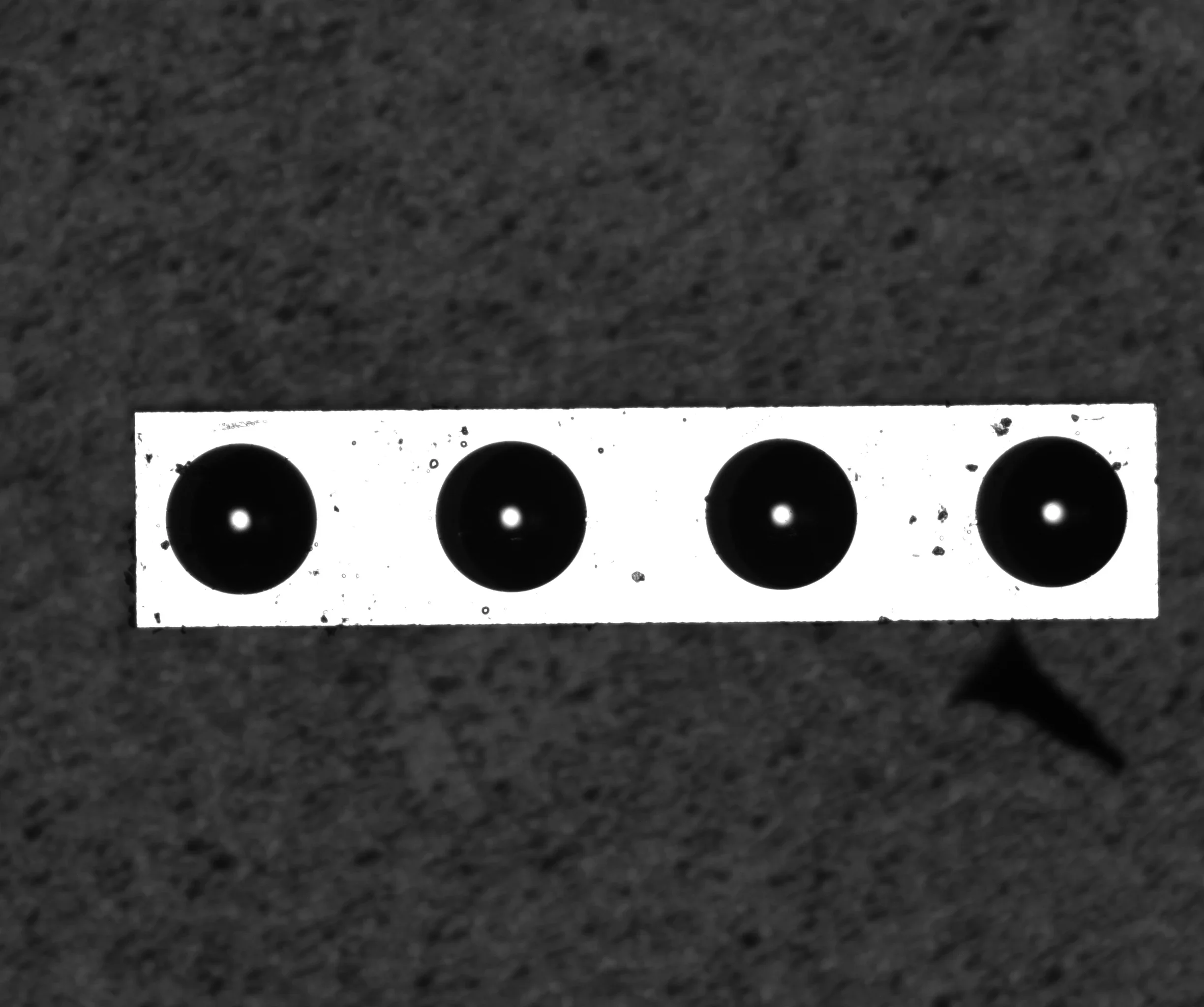
Lower magnification: larger field of view - the sample occupies a smaller part of the image.
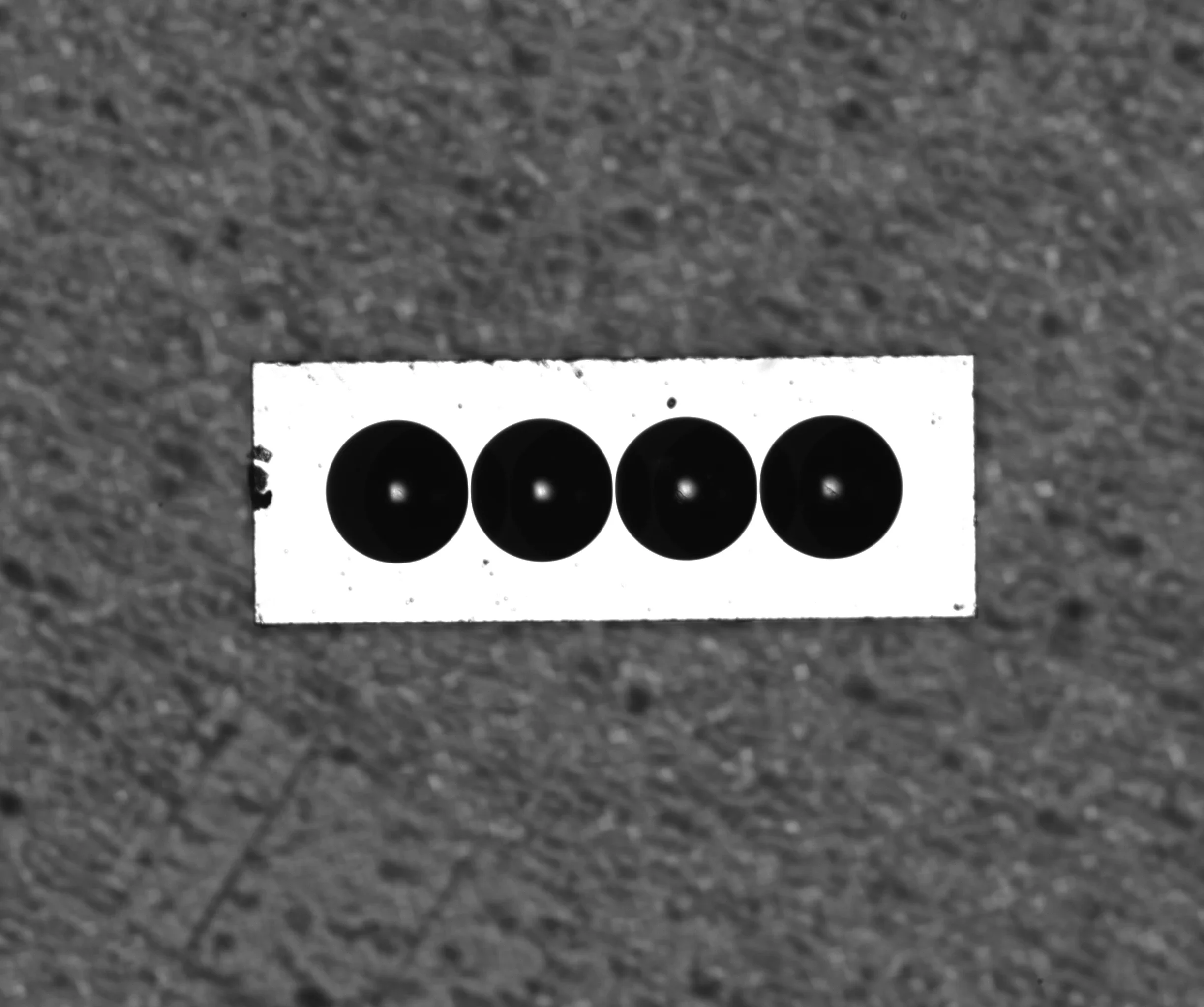
Higher magnification: the field of view shrinks. The FOV change itself is expected - a lateral image shift on top of it is the defect this article explains.
3. Main Causes of Image Position Change
3.1 Optical Group Movement Inside the Zoom Lens
A continuous zoom lens changes magnification by moving internal optical elements.
Ideally:
- Optical axis remains stable
- Image position remains unchanged throughout zoom range
However, real systems may experience small deviations caused by:
- lens assembly tolerance
- mechanical guide accuracy
- transmission backlash
- optical group movement precision
These effects become more visible at higher magnifications.
3.2 Lens and Camera Misalignment
A slight tilt between:
- lens mount
- camera sensor
- adapter ring
may cause optical axis deviation.
Recommended checks:
- Ensure lens mount is fully tightened
- Check adapter installation
- Verify camera mounting plate stability
- Avoid cable pulling force on the lens
- Keep camera perpendicular to the target surface
3.3 Working Distance Variation
Image quality depends strongly on Working Distance (WD).
Changes in:
- product height
- stage repeatability
- fixture stability
may cause:
- image position variation
- focus change
- unstable edge detection
This is especially important for:
- curved surfaces
- tilted surfaces
3.4 No Focus Compensation After Zooming
Some continuous zoom lenses require focus compensation.
Without proper focus adjustment:
- edges become unclear
- image processing becomes unstable
- measurement coordinates may change
Engineers should check separately:
- Did the physical object position change?
- Did image sharpness decrease?
- Did software coordinates change?
4. Why Calibration Is Required at Different Magnifications
A common mistake in automated inspection systems is using one calibration file for all zoom positions.
When magnification changes:
- Pixel size changes
- Field of view changes
- Pixel-to-real-world conversion changes
Using the same calibration data may cause:
- Incorrect measurement results
- Positioning errors
- Incorrect inspection regions
- Robot positioning deviation
For applications involving:
- dimensional measurement
- robot picking
- precision positioning
each commonly used magnification should have independent calibration data.
Recommended saved parameters:
- Pixel resolution
- Inspection template
- Focus position
- Calibration coefficient
5. Does Returning to the Same Zoom Position Guarantee the Same Image?
Not necessarily.
Motorized zoom lenses are affected by:
- Motor accuracy
- Mechanical backlash
- Movement direction
- Position feedback
- Homing method
For example:
Moving from low magnification → high magnification
may produce a slightly different final position compared with:
high magnification → low magnification.
For applications requiring high repeatability, engineers should evaluate:
- zoom positioning repeatability
- feedback method
- actual test results
6. Practical Debugging Method
When a zoom lens causes position variation, follow this sequence:
Step 1: Check Mechanical Installation
Verify:
- lens-camera alignment
- mounting stability
- adapter connection
Step 2: Check Focus Performance
Confirm:
- image sharpness
- focus compensation
- depth of field
Step 3: Test Zoom Repeatability
Perform multiple cycles:
Low → High → Low magnification
Compare:
- image position
- focus state
- measurement results
Step 4: Create Multi-Magnification Calibration
For automated inspection:
- calibrate each commonly used zoom position
- save independent inspection parameters
7. Applications Suitable for Continuous Zoom Lenses
Continuous zoom lenses are suitable for:
- Electronic component inspection
- PCB inspection
- Semiconductor observation
- Industrial microscope systems
- Product changeover production lines
- Machine debugging stations
Advantages:
- Flexible field of view adjustment
- Reduced lens replacement
- Easy system adjustment
8. When Should You Carefully Evaluate Zoom Lens Selection?
Continuous zoom lenses require careful evaluation for:
- High-precision dimensional measurement
- High-speed production with frequent zoom changes
- Robot vision positioning
- Applications requiring fixed pixel calibration
- Systems without recalibration capability
For these applications, engineers should evaluate:
- optical center stability
- zoom repeatability
- focus control
- calibration method
In some cases, fixed focal length FA lenses or telecentric lenses may provide better measurement stability.
Zoom Lens Selection Checklist
Before selecting a continuous zoom lens, provide:
Camera Information
- Camera model
- Sensor size
- Resolution
- Pixel size
- Mount type
Optical Requirements
- Maximum field of view
- Minimum field of view
- Working distance
- Required magnification range
Application Requirements
- Inspection type
- Measurement accuracy
- Position repeatability requirement
- Manual or motorized adjustment
System Requirements
- Motorized zoom?
- Motorized focus?
- Zoom feedback?
- Communication control?
FAQ
Is image shifting after zoom adjustment normal?
A small amount of image movement can occur due to optical and mechanical tolerances. Whether it is acceptable depends on the application requirements and lens specifications.
Does motorized zoom automatically provide autofocus?
No.
Motorized zoom and autofocus are independent functions. A lens can change magnification without automatically maintaining focus.
Should each zoom position have separate calibration data?
For measurement and positioning applications, yes. Different magnifications normally require separate pixel calibration and inspection parameters.
Conclusion
Continuous zoom lenses provide excellent flexibility for machine vision systems requiring multiple observation ranges. However, stable performance depends on more than magnification range.
Proper system design requires consideration of:
- optical alignment
- working distance
- focus compensation
- zoom repeatability
- multi-position calibration
By evaluating these factors during lens selection and system commissioning, engineers can achieve reliable and repeatable multi-magnification inspection.
Further reading: the test methods behind this article are documented in POMEAS Technical Reference the standard parfocality adjustment sequence and how to separate the causes (§§8.11) + #s55).
Related reading
- What is a motorized zoom lens? — how the zoom and focus axes are driven, and why parfocality has to be calibrated.

Subscribe to Our Newsletter
Simply enter your email to receive the latest news and insights from Pomeas. Stay connected with Pomeas and be the first to discover new innovations in optical excellence.