Knowledge
Optical Magnification vs Digital Magnification: What Each One Changes on the Image
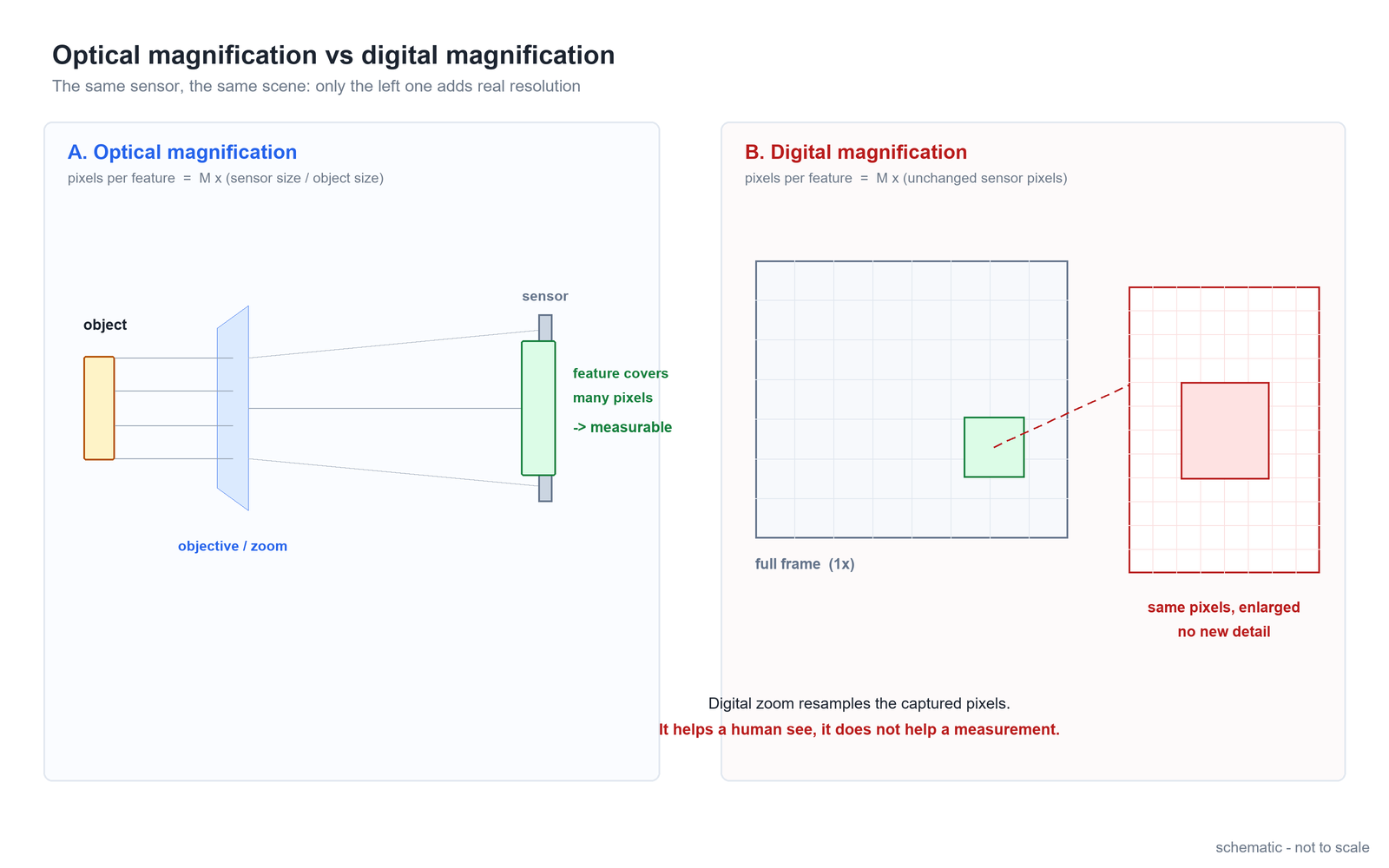
In brief: optical magnification projects a larger image of the object onto the sensor, so every feature covers more pixels — that is real resolution you can measure with. Digital magnification takes the pixels that were already captured and resamples them larger on the screen: the feature is displayed bigger, but it still covers exactly the same number of pixels. One changes the optics, the other only changes the display. For inspection and measurement the difference is decisive, because the smallest feature a system can resolve is set by the optics, not by the zoom slider in the software.
Part of the POMEAS Machine Vision Optics Comparisons series — see the Machine Vision Optics Comparisons index for all 15 articles in this set, grouped by the option being compared.
The one-line difference
Optical magnification changes how much of the object lands on one pixel. Digital magnification changes how much of the image lands on one screen point. Everything else follows from that.
What optical magnification actually does
In a machine vision system the total optical magnification is the product of the optical stages in the path — for a zoom-lens system, typically the zoom body, the tube lens (or camera adapter) and, when fitted, a front objective. Whatever that product is, it defines a single number that matters for measurement: the object-space pixel size.
Object-space pixel size = pixel pitch ÷ total optical magnification — general geometric relation.
As a worked example only: a sensor with 3.45 µm pixels at 1X optical magnification samples 3.45 µm of the object per pixel; at 4X it samples 0.86 µm per pixel. Nothing was added by software — the optics simply spread the same feature over four times more pixels in each direction.
This is why magnification is a selection parameter and not a display setting: it fixes what the sensor can see at all, together with the field of view (FOV = sensor size ÷ magnification) and, in practice, the depth of field around the working distance.
What digital magnification actually does
Digital magnification — digital zoom, electronic magnification, "zoom in" in the viewer — starts after the image is captured. The software selects a region of the already-recorded pixels and resamples it to a larger display size. Three things are true at the same time:
- The object-space sampling does not improve. The feature covered 3 pixels before the digital zoom; it covers the same 3 pixels after. The pixels are displayed larger, not replaced by better ones.
- The field of view shrinks. Cropping the centre of the frame throws away the rest of the scene — that part is gone, it is not stored anywhere else.
- Interpolation smooths, it does not resolve. Resampling adds no information; aggressive upscaling can even make edges look softer than the raw capture.
None of this makes digital magnification useless. It makes it a viewing tool, not a measuring tool.
Side-by-side comparison
| Aspect | Optical magnification | Digital magnification |
|---|---|---|
| Changes | The image formed on the sensor | Only how captured pixels are displayed |
| Object-space pixel size | Improves (pixel pitch ÷ M) | Unchanged |
| New detail resolved | Yes, up to the lens resolution limit | No — interpolation only |
| Field of view | Shrinks as M rises (sensor ÷ M) | Shrinks by cropping |
| Reversible? | Physical: needs the optics to change | Yes — it is a display operation |
| Valid for measurement | Yes | Only inside the accuracy already captured |
| Cost of getting it | Optical design, working distance, mechanical length | One line of software |
Where digital magnification is still useful
Used honestly, digital zoom has three legitimate jobs. First, operator review: letting a person look closely at a defect the system has already detected costs nothing and adds no measurement error, as long as the coordinates come from the original capture. Second, framing and setup: during commissioning, digital zoom helps align the part before the optical magnification is fixed. Third, documentation: an enlarged crop communicates a defect to a colleague faster than an arrow on a full frame. In all three cases the rule is the same: look digitally, measure optically.
The measurement consequence
The practical test is simple: ask what happens to the smallest feature the system can reliably detect. With optical magnification, doubling M halves the object-space pixel size, so a feature that previously spanned 3 sampling points now spans 6 — this is what unlocks smaller defects (a common sampling rule asks for at least 3 image points across the feature to be measured). With digital magnification, the same feature still spans 3 pixels; it is just a bigger, smoother 3 pixels on the monitor.
This is also why "zoom in until you can see it" fails as a capability argument in machine vision, and why lens selection starts from the feature size and the sensor, not from the display. If the optics never put enough pixels on the feature, no amount of digital zoom recovers it — the information was never captured.
How to tell which one you are using
- Watch the noise. Digital zoom enlarges captured pixels, so sensor noise is enlarged with them — grain becomes visibly coarser as you zoom digitally. Optical magnification does not change the noise per pixel.
- Check what the hardware did. If the lens did not move, the illumination did not change and the working distance is the same, no new optical information entered the system — whatever got bigger was digital.
- Read the file, not the screen. Export the raw capture: if the feature's pixel span is identical with and without the zoom, the zoom was digital by definition.
Frequently asked questions
Does digital zoom improve measurement accuracy?
No. Digital magnification resamples pixels that were already captured, so the object-space sampling is unchanged. Measurement coordinates must come from the original capture; the zoomed view is for the operator, not for the algorithm.
Why does my image get noisier when I zoom in digitally?
Because you are enlarging the captured pixels, sensor noise is enlarged with them. The noise per pixel did not change — the display magnification did. This is one of the quickest ways to tell digital zoom from optical zoom.
Can digital zoom replace a higher-magnification lens?
Not for detection or measurement. If the feature does not cover enough pixels in the optical image, the information is missing from the capture and cannot be reconstructed. Digital zoom can only help you look at what was already resolved.
How much optical magnification do I need for my feature size?
Work backwards from the smallest feature you must measure: as a common sampling rule, it should span at least 3 image points, which sets a maximum object-space pixel size, and therefore a minimum optical magnification for your sensor's pixel pitch. Then check the resulting field of view still covers the part. For a concrete combination, send us the part size and the feature to be measured.
Related products
- Industrial lenses — zoom, FA and telecentric optics where optical magnification is a design parameter.
- Microscopes and surface profilers — high optical magnification for micrometre-scale features.
- Machine vision accessories — cameras and objectives that set the pixel pitch behind the magnification.

Subscribe to Our Newsletter
Simply enter your email to receive the latest news and insights from Pomeas. Stay connected with Pomeas and be the first to discover new innovations in optical excellence.